/
Ladoerr Software

Business systems for any company, in any country

Sell, keep your books and manage your people with the Ladoerr Software family. Every system is set up to your requirements: your currency, taxes, language, documents and way of working. Use them online, install them on your computer or phone, and get support from our team wherever you are.

LadoPOS

LadoPOS

Point of sale & stock

Fast selling with a barcode scanner, receipts, stock in every branch, shifts and Z-reports, and more than 30 reports.

LadoBooks

LadoBooks

Accounting & payroll

Customers, vendors, inventory, banking, chart of accounts, payroll with statutory deductions, approvals and financial reports.

LadoHR

LadoHR

HR & Payroll · staff app

Attendance check-in, tasks, daily reports, leave, payslips, loans, appraisals, internal mail and chat, on any phone or computer.

Any countryCurrency, taxes and language set up for you
Your requirementsForms, reports and workflows adapted to your business
Online or installedBrowser, Windows, Mac, Android and iPhone
Setup & trainingData migration and staff training, on site or remote

LadoPOS

Point of sale and stock control for all your stores

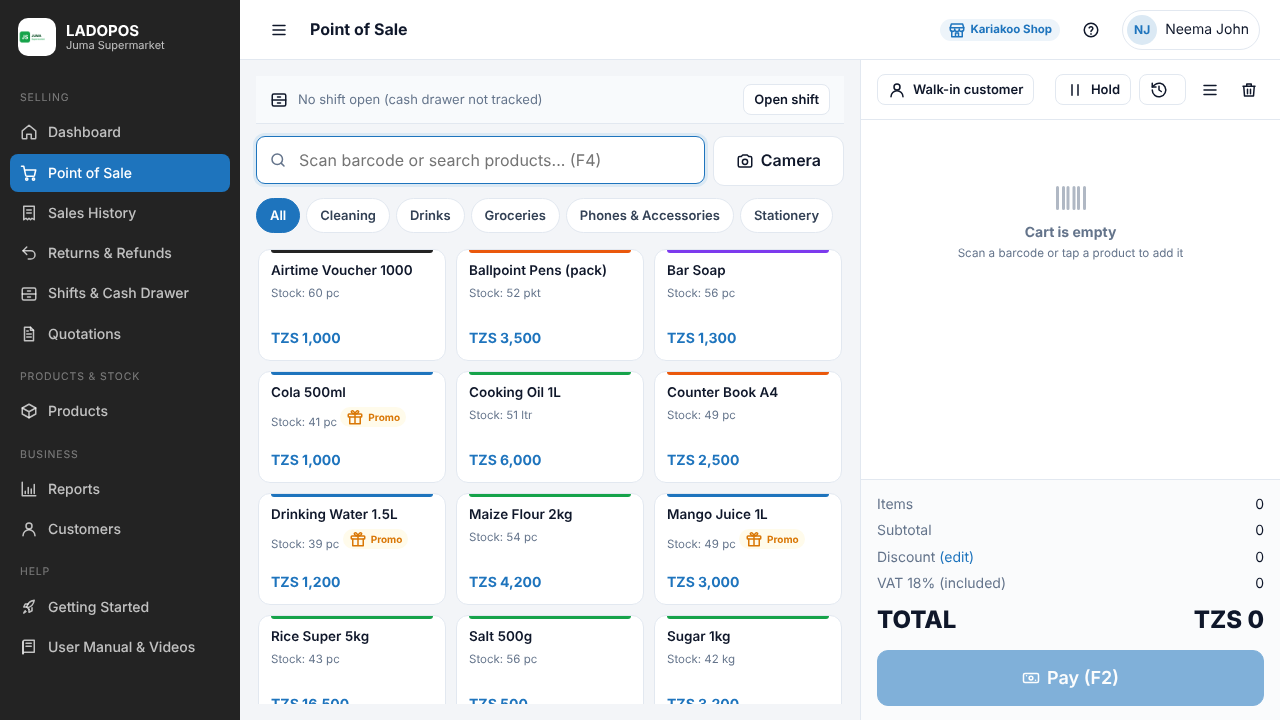
LadoPOS is a point of sale and stock control system for shops, supermarkets, pharmacies, hardware stores and any business with one or many branches. Sell quickly, know your stock in every store, and see your profit every day.

  • Sell with a barcode scanner or by tapping products, and print receipts
  • Cash, Mobile Money, Card, Bank and Credit payments, or a mix
  • Stock in, stock out and stock counts for every store
  • Transfers between stores and branches
  • Print your own barcode labels
  • Customers, credit sales and loyalty points
  • Suppliers and purchase orders
  • Shifts, cash drawer and Z-report
  • Quotations, returns, refunds and promotions
  • Profit, VAT and 30+ reports, export to Excel or PDF
  • Users and roles for each staff member
  • Import from Excel or QuickBooks POS, connect QuickBooks Desktop
Version 2.2.1 Windows 10 / 11 (64-bit) Also online in the browser Manual English & Kiswahili
LadoPOS selling screen
Selling screen

LadoBooks

Enterprise accounting, payroll, HR and approvals

LadoBooks Enterprises Solutions keeps your company's books in one place: sales and purchases, banking, inventory, employees and payroll, with approvals so management controls every payment. It works in the browser and installs on your computer like a desktop program.

  • Customer centre: invoices, receipts and balances
  • Vendor centre: bills and payments
  • Chart of accounts and bank registers
  • Items, services and inventory
  • Run payroll with statutory deductions (e.g. PAYE, NSSF, SDL)
  • Employees and leave
  • Approvals inbox and payment requests
  • Fixed assets and budgets
  • Report centre and company snapshots
  • Your own logo on invoices and forms
  • Import from Excel, move from QuickBooks Desktop or Online
  • Audit trail and security controls
Version 2.4.1 Works on any browser Install on Windows / Mac Sign in per company
ladobooks.ladoerr.co.tz
LadoBooksEnterprises Solutions
Customers
Vendors
Employees
Inventory
Bank Registers
Approvals
Chart of Accounts
Payroll
Reports

LadoHR, HR & Payroll

HR & Payroll: the staff app for every employee and manager

One app for the whole team. Staff check in and out, report their daily work and request leave from their phone, while management approves tasks, follows reports and keeps payslips, loans and appraisals in one place.

  • Check in and out at work
  • To-do lists approved by management
  • Daily work reports
  • Leave requests and balances
  • Payslips, loans and appraisals
  • Official mail with management
  • Chat with colleagues
  • CRM for the marketing team
Android & iPhone Windows & Mac Install free, in seconds
hr.ladoerr.co.tz
LadoHRLadoerr Business Solutions
Check in / out
To-do list
Daily reports
Leave
Payslips & loans
Appraisals
Official mail
Chat
CRM
Choose

Which system is right for you?

Many companies use more than one. LadoPOS also connects to QuickBooks Desktop, and LadoBooks can move your data from QuickBooks.

LadoPOSLadoBooksLadoHR
Best forShops, supermarkets, pharmacies, hardware and multi-branch retailCompanies that need full accounting, payroll and approvalsManaging staff attendance, tasks, leave and reports
Main workSelling, receipts, stock, shiftsInvoices, bills, banking, payroll, financial reportsCheck-in, to-dos, daily reports, payslips
Where it runsWindows program, and onlineOnline, installable on the computerPhone and computer app
How to startDownload, then enter your license keySign in with your company accountInstall, then sign in with the account from HR
Download centre

Download, install and get started

Everything you need to open or install our systems, in one place.

LadoPOS for Windows

LADOPOS-Setup-2.2.1.exe · 72 MB · Windows 10 / 11 (64-bit)

  1. Download and open the setup file. If Windows shows "Windows protected your PC", click More info, then Run anyway.
  2. Click Next, I Agree, Install, Finish.
  3. Enter your license key (connect to the internet the first time).
  4. Register your company and start selling.

LadoBooks

Runs in Chrome or Edge · installs on Windows and Mac

  1. Open LadoBooks in Chrome or Edge.
  2. Sign in with your company email and password.
  3. Choose "Install LadoBooks on this computer", or click the install icon in the address bar.
  4. Open LadoBooks from the Start menu or desktop.

LadoHR app

Android · iPhone / iPad · Windows · Mac · free to install

  1. Open the install page on your phone or computer.
  2. Android: Chrome, then Install app. iPhone: Safari, Share, Add to Home Screen.
  3. Windows / Mac: Chrome or Edge, then Install app.
  4. Sign in with the username and password from HR.

Want a demo, a license or a price?

Talk to our team, wherever your business is. We help you choose the right system, adapt it to your country and your requirements, move your data and train your staff, on site or remotely.